

New 2022 Latest Questions NSE5_FMG-7.0 Dumps - Use Updated Fortinet Exam
Latest NSE5_FMG-7.0 Exam Dumps Fortinet Exam from Training Expert PrepPDF
NEW QUESTION 39
Refer to the following exhibit: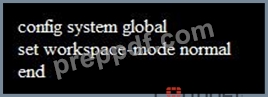
Which of the following statements are true based on this configuration? (Choose two.)
- A. Unlocking an ADOM will submit configuration changes automatically to the approval administrator
- B. Unlocking an ADOM will install configuration automatically on managed devices
- C. The same administrator can lock more than one ADOM at the same time
- D. Ungraceful closed sessions will keep the ADOM in a locked state until the administrator session times out
Answer: C,D
NEW QUESTION 40
Refer to the exhibit.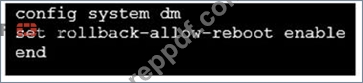
An administrator has configured the command shown in the exhibit on FortiManager. A configuration change has been installed from FortiManager to the managed FortiGate that causes the FGFM tunnel to go down for more than 15 minutes.
What is the purpose of this command?
- A. It allows FortiGate to reboot and recover the previous configuration from its configuration file.
- B. It allows FortiGate to reboot and restore a previously working firmware image.
- C. It allows the FortiManager to revert and install a previous configuration revision on the managed FortiGate.
- D. It allows FortiGate to unset central management settings.
Answer: A
NEW QUESTION 41
An administrator has assigned a global policy package to custom ADOM1. Then the administrator creates a new policy package, Fortinet, in the custom ADOM1.
Which statement about the global policy package assignment to the newly-created policy package Fortinet is true?
- A. When a new policy package is created, it automatically assigns the global policies to the new package.
- B. When a new policy package is created, you need to assign the global policy package from the global
ADOM. - C. When a new policy package is created, you can select the option to assign the global policies to the new package.
- D. When a new policy package is created, you need to reapply the global policy package to the ADOM.
Answer: A
Explanation:
Global Policy Package is applied at the ADOM level and you have the option to choose which ADOM policy packages you want to exclude (there is no option to choose Policy Packages to include).
NEW QUESTION 42
Refer to the exhibit.
Which two statements about the output are true? (Choose two.)
- A. Configuration changes have been installed to FortiGate and represents FortiGate configuration has been changed
- B. Configuration changes directly made on the FortiGate have been automatically updated to device-level
- C. The latest history for the managed FortiGate does not match with the device-level database
- D. The latest revision history for the managed FortiGate does match with the FortiGate running configuration
Answer: C,D
Explanation:
database
Explanation:
STATUS: dev-db: modified; conf: in sync; cond: pending; dm: retrieved; conn: up - dev-db: modified - This is the device setting status which indicates that configuration changes were made on FortiManager. - conf: in sync - This is the sync status which shows that the latest revision history is in sync with Fortigate's configuration. - cond: pending - This is the configuration status which says that configuration changes need to be installed.
Most probably a retrieve was done in the past (dm: retrieved) updating the revision history DB (conf: in sync) and FortiManager device level DB, now there is a new modification on FortiManager device level DB (dev-db: modified) which wasn't installed to FortiGate (cond: pending), hence; revision history DB is not aware of that modification and doesn't match device DB.
Conclusion: - Revision DB does match FortiGate. - No changes were installed to FortiGate yet. - Device DB doesn't match Revision DB. - No changes were done on FortiGate (auto-update) but configuration was retrieved instead
After an Auto-Update or Retrieve: device database = latest revision = FGT
Then after a manual change on FMG end (but no install yet): latest revision = FGT (still) but now device database has been modified (is different).
After reverting to a previous revision in revision history: device database = reverted revision != FGT
NEW QUESTION 43
Which of the following statements are true regarding VPN Gateway configuration in VPN Manager? (Choose two.)
- A. Protected subnets are the subnets behind the device that you don't want to allow access to over the IPsec
VPN - B. Managed gateways are devices managed by FortiManager in the same ADOM
- C. External gateways are third-party VPN gateway devices only
- D. Managed devices in other ADOMs must be treated as external gateways
Answer: B,D
NEW QUESTION 44
View the following exhibit: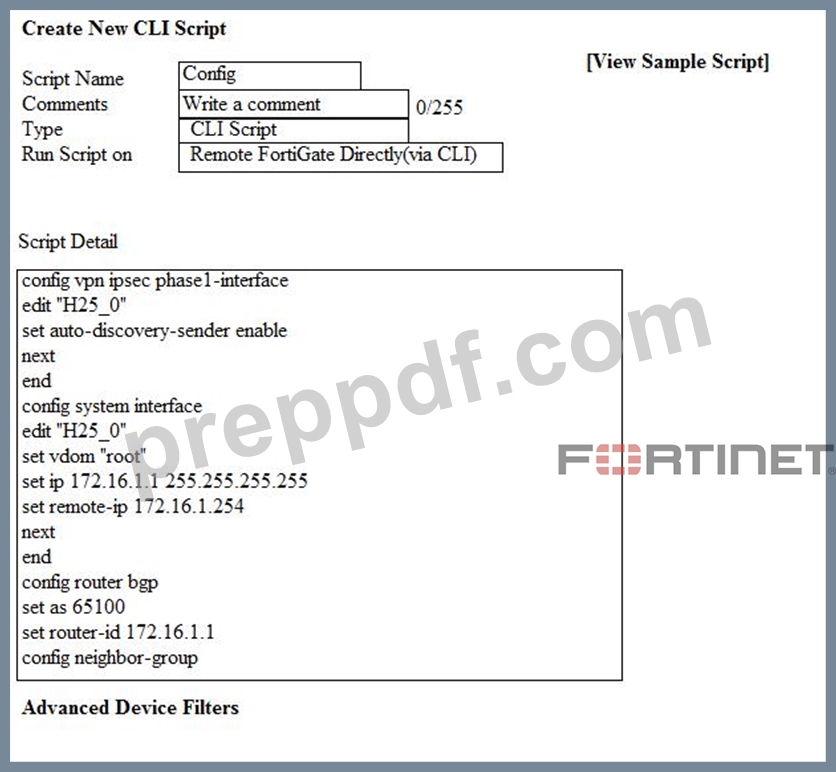
Which two statements are true if the script is executed using the Remote FortiGate Directly (via CLI) option? (Choose two.)
- A. FortiGate will auto-update the FortiManager's device-level database.
- B. FortiManager will create a new revision history.
- C. You must install these changes using Install Wizard
- D. FortiManager provides a preview of CLI commands before executing this script on a managed FortiGate.
Answer: A,B
NEW QUESTION 45
View the following exhibit.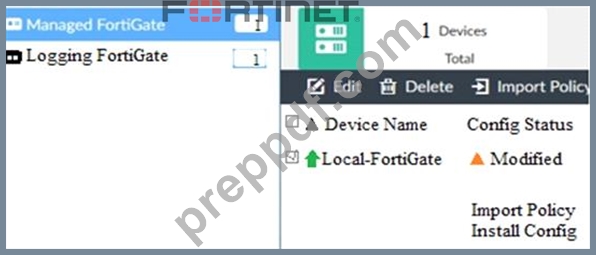
When using Install Config option to install configuration changes to managed FortiGate, which of the following statements are true? (Choose two.)
- A. Installs device-level changes to FortiGate without launching the Install Wizard
- B. Will not create new revision in the revision history
- C. Provides the option to preview configuration changes prior to installing them
- D. Once initiated, the install process cannot be canceled and changes will be installed on the managed device
Answer: A,D
NEW QUESTION 46
An administrator would like to create an SD-WAN default static route for a newly created SD-WAN using the FortiManager GUI. Both port1 and port2 are part of the SD-WAN member interfaces.
Which interface must the administrator select in the static route device drop-down list?
- A. virtual-wan-link
- B. port1
- C. auto-discovery
- D. port2
Answer: A
NEW QUESTION 47
An administrator run the reload failure command: diagnose test deploymanager reload config
<deviceid> on FortiManager. What does this command do?
- A. It downloads the latest configuration from the specified FortiGate and performs a reload operation on the device database.
- B. It installs the provisioning template configuration on the specified FortiGate.
- C. It compares and provides differences in configuration on FortiManager with the current running
configuration of the specified FortiGate. - D. It installs the latest configuration on the specified FortiGate and update the revision history database.
Answer: A
NEW QUESTION 48
An administrator would like to authorize a newly-installed AP using AP Manager. What steps does the administrator need to perform to authorize an AP?
- A. Authorize the new AP using AP Manager and install the policy package changes on the managed FortiGate.
- B. Authorize the new AP using AP Manager and wait until the change is updated on the FortiAP. Changes to the AP's state do not require installation.
- C. Changes to the AP's state must be performed directly on the managed FortiGate.
- D. Authorize the new AP using AP Manager and install the device level settings on the managed FortiGate.
Answer: D
NEW QUESTION 49
View the following exhibit.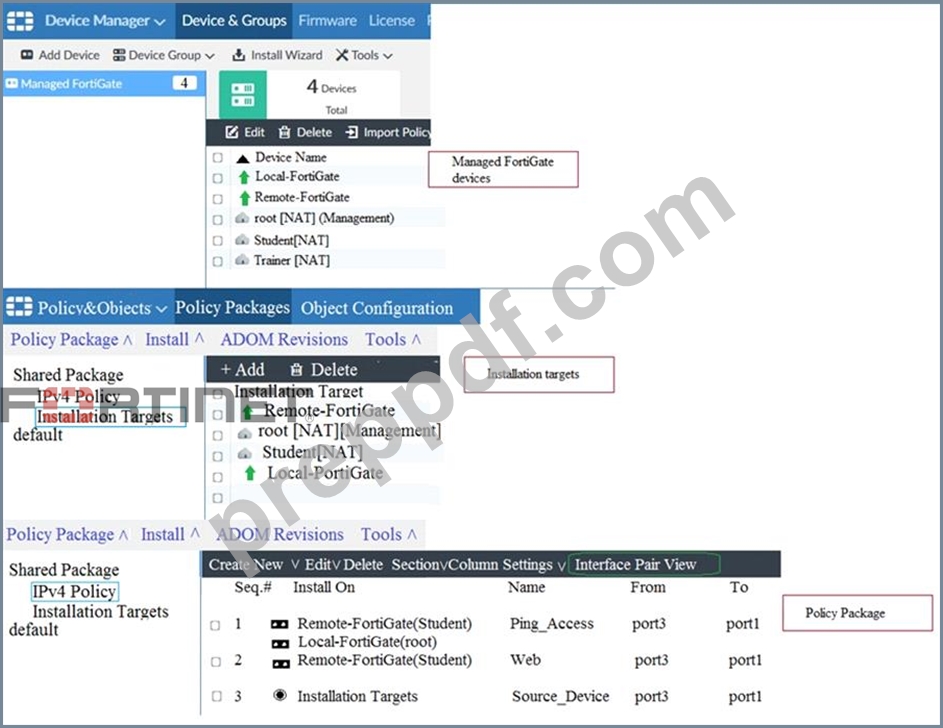
Given the configurations shown in the exhibit, what can you conclude from the installation targets in the Install On column?
- A. Policy seq#3 will be not installed on any managed device
- B. Policy seq#3 will be installed on all managed devices and VDOMs that are listed under Installation Targets
- C. The Install On column value represents successful installation on the managed devices
- D. Policy seq#3 will be installed on the Trainer[NAT] VDOM only
Answer: B
NEW QUESTION 50
What does the diagnose dvm check-integrity command do? (Choose two.)
- A. Verifies and corrects unregistered, registered, and deleted device states
- B. Verifies and corrects database schemas in all object tables
- C. Internally upgrades existing ADOMs to the same ADON version in order to clean up and correct the ADOM
syntax - D. Verifies and corrects duplicate VDOM entries
Answer: A,D
Explanation:
6.2 Study Guide page 305 verify and correct parts of the device manager databases, including: - inconsistent device-to-group and group-to-ADOM memberships - unregistered, registered, and deleted device states - device lock statuses - duplicate VDOM entries
NEW QUESTION 51
What is the purpose of ADOM revisions?
- A. To save the current state of the whole ADOM.
- B. To revert individual policy packages and device-level settings for a managed FortiGate by reverting to a specific ADOM revision
- C. To save the current state of all policy packages and objects for an ADOM.
- D. To create System Checkpoints for the FortiManager configuration.
Answer: C
Explanation:
Fortimanager 6.4 Study guide page 198
NEW QUESTION 52
An administrator, Trainer, who is assigned the Super_User profile, is trying to approve a workflow session that was submitted by another administrator, Student. However, Trainer is unable to approve the workflow session.
What can prevent an admin account that has Super_User rights over the device from approving a workflow session?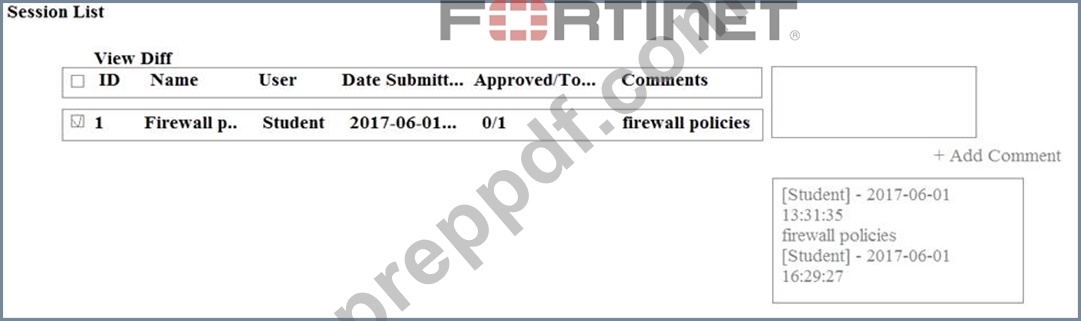
- A. Trainer must close Student's workflow session before approving the request
- B. Student, who submitted the workflow session, must first self-approve the request
- C. Trainer is not a part of workflow approval group
- D. Trainer does not have full rights over this ADOM
Answer: C
NEW QUESTION 53
View the following exhibit, which shows the Download Import Report: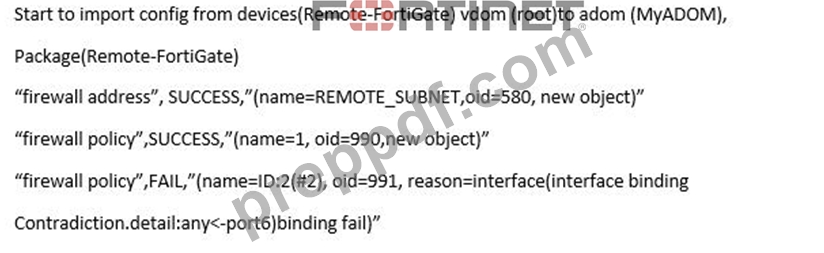
Why it is failing to import firewall policy ID 2?
- A. Policy ID 2 for this managed FortiGate already exists on FortiManager in policy package named Remote-FortiGate.
- B. Policy ID 2 does not have ADOM Interface mapping configured on FortiManager
- C. Policy ID 2 is configured from interface any to port6 FortiManager rejects to import this policy because any interface does not exist on FortiManager
- D. The address object used in policy ID 2 already exist in ADON database with any as interface association and conflicts with address object interface association locally on the FortiGate
Answer: D
Explanation:
FortiManager_6.4_Study_Guide-Online - page 331 & 332
NEW QUESTION 54
Which two items are included in the FortiManager backup? (Choose two.)
- A. Global database
- B. All devices
- C. Logs
- D. FortiGuard database
Answer: A,B
NEW QUESTION 55
View the following exhibit.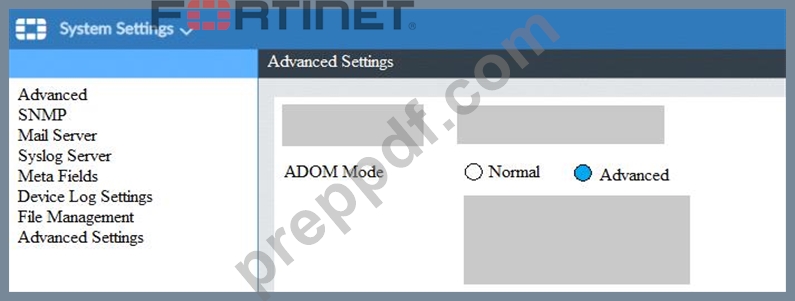
What is the purpose of setting ADOM Mode to Advanced?
- A. The setting disables concurrent ADOM access and adds ADOM locking
- B. The setting allows automatic updates to the policy package configuration for a managed device
- C. This setting allows you to assign different VDOMs from the same FortiGate to different ADOMs.
- D. The setting enables the ADOMs feature on FortiManager
Answer: C
NEW QUESTION 56
An administrator has enabled Service Access on FortiManager.
What is the purpose of Service Access on the FortiManager interface?
- A. Allows FortiManager to respond to request for FortiGuard services from FortiGate devices
- B. Allows FortiManager to automatically configure a default route
- C. Allows FortiManager to download IPS packages
- D. Allows FortiManager to run real-time debugs on the managed devices
Answer: A
NEW QUESTION 57
What does a policy package status of Conflict indicate?
- A. The policy package does not have a FortiGate as the installation target.
- B. The policy package reports inconsistencies and conflicts during a Policy Consistency Check.
- C. The policy package configuration has been changed on both FortiManager and the managed device
independently. - D. The policy configuration has never been imported after a device was registered on FortiManager.
Answer: C
NEW QUESTION 58
An administrator is replacing a device on FortiManager by running the following command:
execute device replace sn <devname> <serialnum>.
What device name and serial number must the administrator use?
- A. Device name and serial number of the replacement device.
- B. Device name of the replacement device and serial number of the original device.
- C. Device name of the original device and serial number of the replacement device.
- D. Device name and serial number of the original device.
Answer: C
NEW QUESTION 59
What does a policy package status of Modified indicate?
- A. The Policy configuration has been changed on a managed device and changes have not yet been imported into FortiManager
- B. The Policy package configuration has been changed on FortiManager and changes have not yet been installed on the managed device.
- C. FortiManager is unable to determine the policy package status
- D. The policy package was never imported after a device was registered on FortiManager
Answer: B
NEW QUESTION 60
View the following exhibit.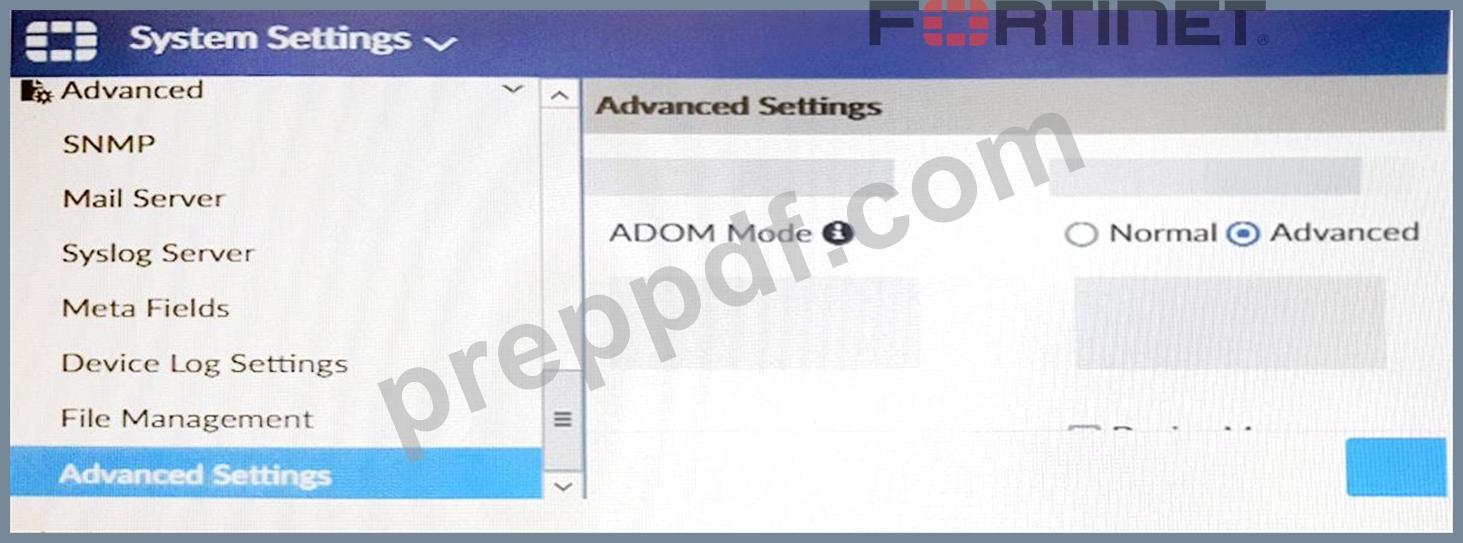
Which of the following statements are true based on this configuration setting? (Choose two.)
- A. This setting will allow automatic updates to the policy package configuration for a managed device.
- B. This setting will enable the ADOMs feature on FortiManager.
- C. This setting will allow assigning different VDOMs from the same FortiGate to different ADOMs.
- D. This setting is applied globally to all ADOMs.
Answer: C,D
NEW QUESTION 61
Which two conditions trigger FortiManager to create a new revision history? (Choose two.)
- A. When FortiManager installs device-level changes to a managed device
- B. When FortiManager is auto-updated with configuration changes made directly on a managed device
- C. When changes to device-level database is made on FortiManager
- D. When configuration revision is reverted to previous revision in the revision history
Answer: A,B
NEW QUESTION 62
Which two statements regarding device management on FortiManager are true? (Choose two.)
- A. FortiGate in transparent mode configurations are not counted toward the device count on FortiManager.
- B. FortiGate devices in an HA cluster that has five VDOMs are counted as five separate devices.
- C. The maximum number of managed devices for each ADOM is 500.
- D. FortiGate devices in HA cluster devices are counted as a single device.
Answer: B,D
NEW QUESTION 63
In the event that the primary FortiManager fails, which of the following actions must be performed to return the FortiManager HA to a working state?
- A. FortiManager HA state transition is transparent to administrators and does not require any reconfiguration.
- B. Manually promote one of the secondary devices to the primary role, and reconfigure all other secondary devices to point to the new primary device.
- C. Secondary device with highest priority will automatically be promoted to the primary role, and manually
reconfigure all other secondary devices to point to the new primary device - D. Reboot one of the secondary devices to promote it automatically to the primary role, and reconfigure all other secondary devices to point to the new primary device.
Answer: B
Explanation:
FortiManager_6.4_Study_Guide-Online - page 346
FortiManager HA doesn't support IP takeover where an HA state transition is transparent to administrators. If a failure of the primary occurs, the administrator must take corrective action to resolve the problem that may include invoking the state transition. If the primary device fails, the administrator must do the following in order to return the FortiManager HA to a working state:
1. Manually reconfigure one of the secondary devices to become the primary device
2. Reconfigure all other secondary devices to point to the new primary device
NEW QUESTION 64
......
Updated Test Engine to Practice NSE5_FMG-7.0 Dumps & Practice Exam: https://passcertification.preppdf.com/Fortinet/NSE5_FMG-7.0-prepaway-exam-dumps.html